Thursday, February 27, 2014

QGIS 2.0 Dufour on a Nexus 7 Tablet

An update for readers of last year's post about QGIS on a Nexus 7 tablet/slate.  In this post, I will  cover downloading, installing, and using QGIS on a Nexus 7 Tablet (1st Generation, 8 GB) running Android 4.4.2 KitKat.  This is the same tablet I used last year.  Keep in mind this tablet's touchscreen is only 7 inches.  Larger tablets are on their way, with a 12" Samsung tablet already available.

You will also gain an understanding of what additional apps you will need to make the experience as smooth as possible.  Lastly, I'll discuss the strengths and weaknesses of QGIS on this particular tablet.

QGIS on Android is a work in progress.  Since many people may try installing QGIS for Android on their own tablet, a friend's, or even a work device, proceed at your own risk. To date: I have not had any problems with installing QGIS on my tablet.

Downloading, Pre-Install, and Installation
  • Before installing QGIS, make sure your device has enough space for installation (~600 MB) and downloading at least a few GIS-related shapefiles or rasters.  On mobile devices, storage can run out really fast.
  • Head over to the QGIS for Android page and select the "Download" link, then click the link for QGIS installer at the top of the page to download the *.apk or Android Application Package.
  • You will also have to download Ministro which is available on Google Play.
To make your QGIS experience even better also download a file explorer app, such as File Manager, and a de/compression app like EasyRar or ZArchiver --since GIS files are really a set of files that work together. Clicking on the screenshots below will enlarge them.

A screenshot of an unpacked shapefile in File Manager
After downloading the APK, head to your download folder and follow the onscreen instructions.  Installation will take a few minutes.  QGIS will appear as a little green android icon with a Q on its stomach.  After starting QGIS, you will be greeted with the familiar loading screen and tips.

Using QGIS
When using QGIS on a tablet, you may want to consider un-checking the "render" button until you are ready for your map to be displayed.  You will  also notice a "canvas rendering" progress bar while maps are rendering.

For this post, I visited the National Atlas page in my tablet's Chrome browser and downloaded several tar files.  Next, I navigated to my "Download" folder on my device, extracted then to a new folder, and then unpacked the contents.

A Single Vector Layer
Even on a small tablet,you can see a lot of real estate...

 Unemployment Rate 2009, by County
Raster and Vector Data
Like a desktop GIS and QGIS on desktop, you can begin to create eye catching and more complex map products--with multiple layers, data types, and labels.
Hawaii, cities, volcanoes, and risk of lava flows, transparent, overlaying imagery. 
Metadata 
Metadata, important regardless of where you do your GIS work, can be viewed using several different programs, below using Android's text editor:


Saving a Map
One esoteric step is when you go to save a map or *.qgs file.  You will have to add the file extension ".qgs" to your filename to be able to successfully save your map. Otherwise, the "save" button will not be available.  (I am currently looking through the bug listings to see if this is already a known issue.)

Impressions 
Good with improvements over earlier versions.  Overall, installing, importing data, symbolizing it, and other basic features of QGIS 2.0 are easy to implement on a small seven inch tablet.

However, you will need patience working on a seven inch screen and there are limitations.  For example, some slide bars for large drop down menus were too thin to select, even with a stylus.  Reordering layers was almost impossible using this small touchscreen.  The map composer was also too difficult to use and did not display well.  Crashes are rare and generally occur when the user performs several different actions very close together in time or sequence.  Performance will vary depending on the device you use.

Newer tablets have increased processing power, memory, and storage--all of which should help performance.  Given the rapid rise of mobile, having a free desktop GIS on tablet so soon is a big achievement!  Later this year, I plan to get a larger tablet--which should improve the ease of use with QGIS. I will be sure to install QGIS for Android and give it another go!

Thursday, February 13, 2014

A Second Free Look at the Luxor Hotel...with LAStools

I took a second look at the Luxor Hotel but this time with LAStools in QGIS.  If you missed the first post, check it out here: http://opensourcegisblog.blogspot.com/2014/01/a-free-look-at-luxor-hotel-in-las-vegas.html

Before I go a step further, it is important to note how to install LAStools into the processing toolbox of QGIS.  Essentially there are two parts: 1) adding a new "Lidar" folder to the QGIS program folder and 2) activating and linking LAStools to QGIS. Avoid placing this folder in any directory with a name that has spaces in its name, for example \My Documents\.

After that, it should be smooth sailing!  It is a really powerful toolbox that integrates well into QGIS.  There is also an ArcGIS toolbox too.

LAStools comes with a lot of different features for viewing and understanding lidar data.  Just a few of them are implemented below. Click on any of the images to magnify them.


                         Using lasclassify...
The same lidar data classified into different categories using lasclassify--and triangulated.


                       Using las2dem and las2iso...
Contours overlaying a raster DEM using las2dem and las2iso.
                         Up close - an impressive view:
The details of the sphinx, including head, front and rear legs, can be easily distinguished.
 

Tuesday, February 4, 2014

CrimeStat IV Released...Not Just for Crime Analysis...

CrimeStat IV was recently released, but you do not need to be a crime analyst to appreciate it or find it useful. CrimeStat is a lightweight piece of freeware with heavyweight analytical capabilities. 

Last year, I used CrimeStat to show different programs performing basic density analysis.  But, CrimeStat can really do a whole lot more!  CrimeStat IV boosts 60 different routines, so there is plenty of analytic power in this Windows-based program.

An abbreviated list of features:
  • Importing two files with X/Y coordinates
  • Creating a reference grid
  • Using different types of distance measurement
  • Measures of Spatial Distribution (Mean center, standard distance,etc.)
  • Spatial Autocorrelation Indices
  • Distance Analysis (Nearest neighbor, Ripley's K,...)
  • Hot spot analysis 
  • Spatial Modeling/Interpolation
  • Journey-to-crime analysis
  • Spatial Modeling (several types of regression models)
  • Time-series forecasting
First, CrimeStat is not a GIS.  For example, you cannot view, create, or edit spatial data or visualize any maps/GIS-related files within it.  Rather, it is a program that imports, conducts spatial analysis, and exports results for being imported into any GIS.

On the other hand, you can import GIS-related file types such as shapefiles, *.dbf files, and ASCII/delimited files (i.e. *.csv).  Once you have decided on what type of analysis you are going to run, be sure to read how to import your data.  Once past this minor obstacle, you will be free to conduct your analysis...for free!

CrimeStat's tabs make navigation easy.  The program opens to the Data Setup tab--which is a necessary first stop. Click to magnify the screenshot below.
Like many free and open source programs, learning on how to import your data is a crucial first step!  Understanding your projection, as always is also key, especially when moving the results back into a GIS.
The Spatial Description analysis tab shows the basic premise of CrimeStat.  After loading your data, the program makes the necessary computations and 'saves result to'/Saves output to a folder for importing into a GIS.
Since this is version 4.0, CrimeStat's documentation is well organized by type of analysis.  The website contains plenty of exercises and sample data to minimize.  I was a bit disappointed that a Quick Guide is actually more like previous' versions workbooks--and exceeds 200 pages.  I would recommend starting at Chapter 1 and reading each of the first few chapters on it own.  You can then move on to specific analytic chapters--as needed.  Still, all the documentation is in order. Lastly, you will find real world case studies by leading researchers.

In sum, pairing CrimeStat IV with a free GIS, such as QGIS, makes for a powerful and free combination!

Wednesday, January 22, 2014

A Free Look at the Luxor Hotel in Las Vegas

A while back, I wrote a brief post on FUSION LIDAR viewing software.  In this post, I will use real world data with the FugroViewer, freeware from the Dutch company Fugro.  

I downloaded LIDAR data from EarthExplorer -- focusing on downtown Las Vegas, specifically the pyramidal Luxor Hotel. The hotel's shape is so constraining that it needs specialized elevators, which tilt and shimmy, up to visitors' rooms. Of course, it is noteworthy to mention that LIDAR is also being utilized to search for ancient lost pyramids.

At first glance, the Luxor hotel is hard to pick out.  However, increasing the point display size from the menu helps to highlight its unique shape. Alternatively, I could also have tried turning off some returns or chosen to highlight specific values for different LIDAR attributes. Redder points have higher elevation values.  Click on the screenshots below to magnify them. 

Can you see the Luxor Hotel?
LIDAR points can be converted into TINs to help visualize what we are looking for.  The three panes below show three different views: overhead (left), a cross-section profile (upper right), and 3-D (bottom right).

Left: Overhead view with a view selected with the Profile tool.  Top Right: View from the Profile Tool.  Bottom Right: A 3-D view of the TIN generated from the LIDAR data clearly showing the Luxor Hotel and nearby attractions.

A slightly cleaned up 3-D view of the Luxor Hotel.
Lastly, LIDAR can be used to measure dimensions with great precision and accuracy.  The Luxor Hotel is listed at 107m.  Using the measurement tool, a height of ~ 107m  (104.7m) is calculated.

How tall is the Luxor Hotel?  Here, a quick measurement calculates about 105 meters-close to its actual 107m.
UPDATE on 1/25: I was able to add in imagery in Fugro viewer.  It has to be a single-band georeferenced image.

NEW: LIDAR data with satellite imagery underneath.

Google Street View of the Luxor and surrounding area

See also:
FUSION Viewer
LIDAR Exercises

Monday, January 20, 2014

Be Weather-Ready...The Open-Source Way...

More snow is on the way for the east coast, but it is not the 5 to 6 inches of snow that has me excited!  Weather forecasts and data are probably one of the best examples of an open-source philosophy.  Sure there is privatization, since there is always a new innovation or buck to be made, but the amount of data collection, visualization, and analysis is growing more and more impressive.  Even large companies such was the Weather Channel turn to open source.

Maps play a vital role in communicating location-based weather-related risks.  A lot of web-based weather maps and and apps are out there. I won't dare creating a list, since I will probably miss your favorite. A quick Google search even reveals OpenWeatherMap.org complete with an API.

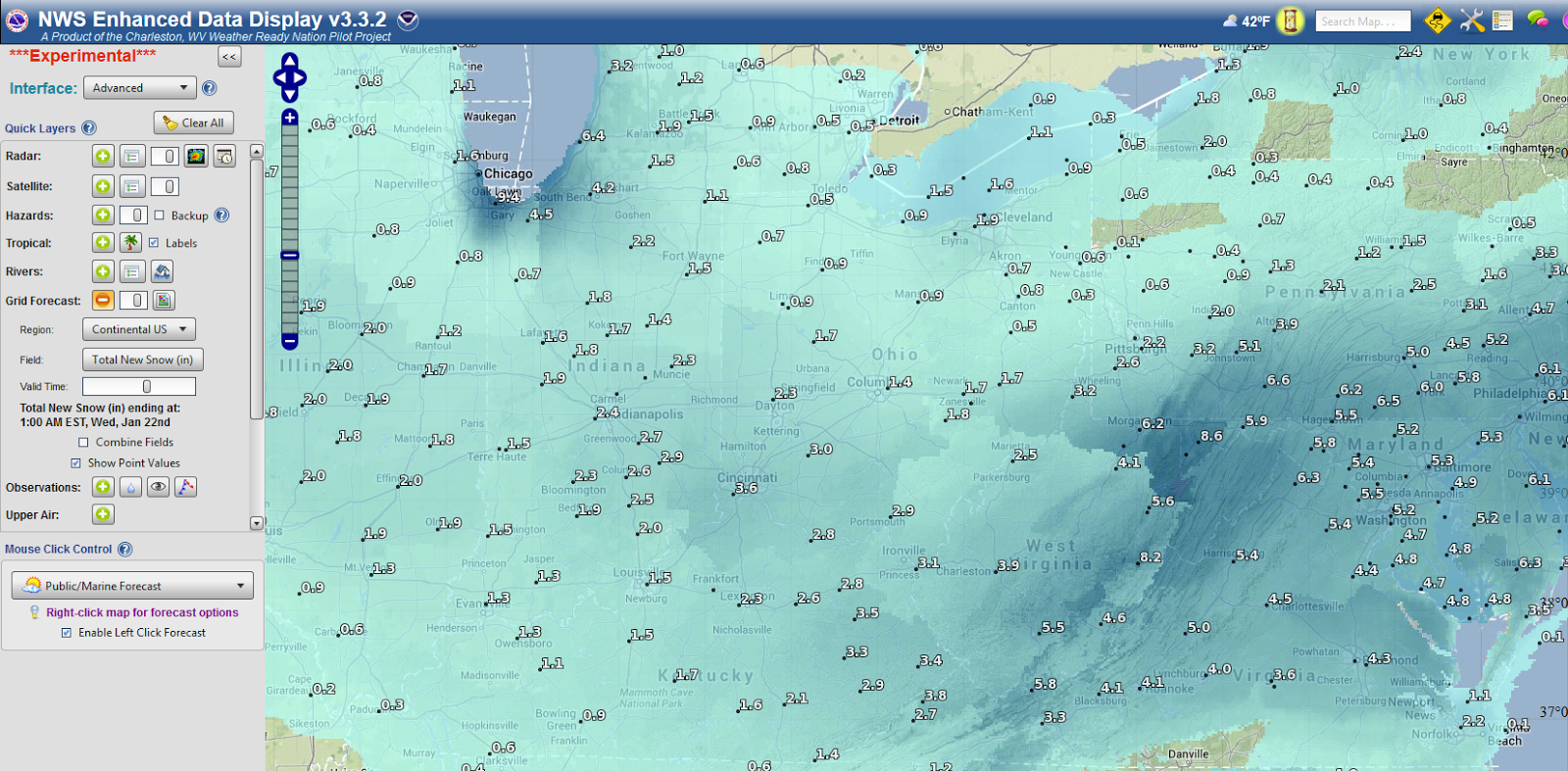
The National Weather Service (NWS) has several different open web-based mapping options.  Most recently, I stumbled upon their ESRI-based app:NWS Enhanced Data Display.  Since it is a simple, easy-to-use well designed app, it is worth a blog post!  Click on the image below to magnify the screenshot.  It is an improvement over other NWS products and similar maps out on the web, because it is designed with the user(s) in mind.

The NWS Enhanced Data Display - Snow Predictions
First, different types of users--whether concerned with basic hazards, fire, marine, or aviation risks, can be selected.  The choice of user changes the app to focus on what different users need to see (and more importantly what they don't need to see!).  Brillant!

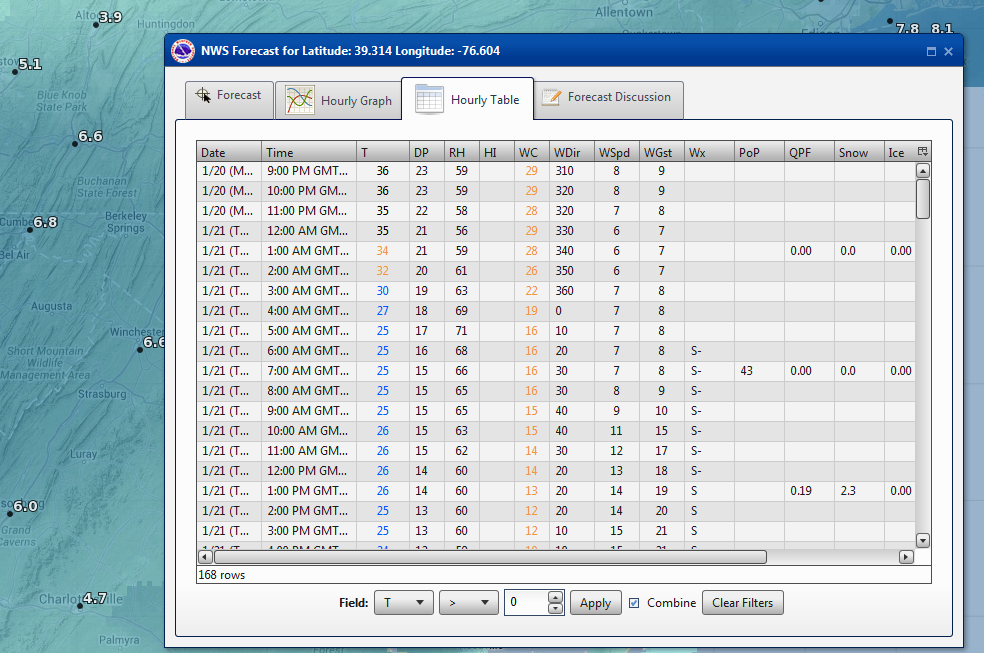
Clicking on individual weather stations, or searching for one, brings up all the needed forecasts and hourly graphs.  Users can also add their own map files and draw polygons to get forecasts for specific regions, which may cross several state boundaries. There are also some basic storm-tracking/analytical functions such as a storm's time of arrival. Lastly, when a user is done, they can even share the map by clicking a "Save/Share" button at the bottom of the screen. A small url is generated and can be shared.

Hour-by-Hour Predictions...
Overall, a simple weather map that is easy to use is one that will be used more!  So, next time you hear your local forecast, don't forget to log-on to the the web to check out the specifics and even share a map with family and friends!

Also check out:
NWS GIS Data Portal
NWS Aware Report

Friday, January 3, 2014

Happy New Year!...What's Ahead This Year...

What can you look forward to from the Open Source GIS Blog--in the year ahead?  Well I hope to get the New Year off to a good start by finishing some R code for cleaning messy address fields. 

Most importantly, I will be featuring more ArcGIS vs. Open Source GIS "showdowns/throw downs"--comparing similar features in paid vs. free and open source GIS software, focusing on spatial analysis and other features.  These are one of my favorite posts to write but usually take the most time to create.  Here, you can check out one past post about kernel density in ArcGIS vs CrimeStat. I cannot guarantee open source GIS will win every time, but the journey will be fun!  In addition, we will be taking a look at download and using Landsat 8 data.  I also plan on posting more book reviews on books about open source GIS and other relevant topics.
Announcement:  If you are interested in Android App Development, check out the Coursera course "Programming Mobile Applications for Android Operating Systems" from the University of Maryland.  I will taking it and hope to see you there!  The course is free.  However, Coursera offers a Verified Certificate for $49--which may be worthwhile for professional development.  The course beings on January 21st, and lasts 8 weeks, so if you are interested get registered now!  Check out the video below!


I started this blog about two years ago...this will be third year!  Each year, I try to post higher quality information so stay tuned.  By the numbers, a few statistics:
  • The blog has had a modest 5,700 page views since its first creation in February 2012. 
  • Viewers have come from many different countries. 
    • The most frequent users hail from my home county of the US, Latvia (real or bots/spam?), Germany, UK, Russia, France, Canada, Australia, China, and India.  However, many different countries have viewers including: Brazil, Portugal, and South Korea, and the list goes on! 
  • There have been 56 posts - each with an important piece of information, software, analysis, web map, or links to great resources.
  • By browser: 35% of page views have been in Firefox, 27% from Chrome Browsers, 23% from Internet Explorer, and the remainder from other mobile browsers.
  • By operating system, most users are using Windows (74%), Mac (8%)--with reminder from Linux and mobile OS.
If there is something you would like to see on the blog, feel free to write in the comments below.  Again, happy new year!

Sunday, December 1, 2013

Book Review: Learning QGIS 2.0

The best place to discover QGIS is "Learning QGIS 2.0" by Anita Graser for its brevity and attention to detail.  Making great maps using QGIS, a free and open source desktop GIS, is only a few steps away using this book.  Released in September 2013, it is the most up-to-date reference on how to get the results you want using QGIS.  I finally had a chance to read the e-book in its entirety and here is what I think.

The book was written for a range of audiences--including newcomers and more seasoned veterans.  It covers basic and advanced topics from installing QGIS, whether a user or developer and  Ubuntu/Linux or Windows, to adding and editing map data.  In addition, the book contains color screenshots to illustrate what actions are being performed.

The book proceeds logically and words are used efficiently. It helps users add different types of GIS-related data, understand how QGIS treats projections, and highlights vital mapmaking tasks such as symbolizing and labeling.   It also covers QGIS' plugins, notably the Open Street Map plugin for using common basemaps and the Heatmap plugin for density analysis.

Later topics include using the Map Composer (analogous to Layout View in ArcGIS) and the Graphical modeler (Model Builder in ArcGIS). 

Two potential criticisms of open source software are that they tend be harder to use than their paid counterparts.  In addition, some programs lack easy-to-read and authoritative documentation.  With "Learning QGIS 2.0", these barriers no longer exist.   The timing of the book could not be more perfect with the release of QGIS 2.0 Dufour.

When you finish the book, be sure to visit Anita Graser's blog at: http://anitagraser.com/.  It is a real treat!  There you can gain even more advanced knowledge.

To purchase Learning QGIS 2.0 visit Packt Publishing or Amazon.com and Kindle.  The book is available both in e-book formats and physical paper copies/softcover.  E-book formats run about $12.  You can also get a physical copy of the book and all e-book formats for ~$25 on the publisher's site.  Released Sept 2013, 110 pages.

Available from Packt Publishing and Amazon/Amazon Kindle